Where do I hold my phone to scan the sticker?
Please note
Android phones are not supported yet. To scan the sticker, please use an iPhone for now. Android support is on its way — stay tuned.
Your phone reads the sticker through a small antenna, and that antenna is not the whole back of the phone — it is a patch roughly the size of a coin. Everything depends on putting that patch over the sticker. On an iPhone it sits at the very top. On most Android phones it sits in the middle of the back.
The tap, step by step
- Wake the phone and unlock it. Almost every phone refuses to read a tag while locked. You can stay on the home screen — you do not need to open anything.
- Lay the shaded area above flat against the sticker. Not the edge, not at an angle — flat, and nearly touching.
- Hold still for about two seconds. This is the step people skip. A tap is really a short pause.
- If nothing happens, go hunting. Slide the phone slowly across the sticker, an inch at a time. The moment the antenna crosses it, you will feel a buzz or see a banner.
Android: where the antenna sits, by make
Android is not one phone, and makers do not agree on where to put the antenna. The middle of the back is the safe first guess, with these tendencies:
| Make | Usual spot |
|---|---|
| Samsung Galaxy | Centre of the back, just below the camera module |
| Google Pixel | A little above centre, below the camera bar — but on Pixel 11 it moved up to the top of the phone |
| OnePlus | Centre of the back, below the camera |
| Xiaomi | Around the middle, close to the camera |
| Anything else | Start in the middle and slide upward toward the camera |
Can my phone read the sticker at all?
- iPhone XR, XS and anything newer (including every iPhone SE from the 2nd generation on) reads tags on its own. Nothing to install, nothing to switch on.
- iPhone 7, 8 and X have the hardware but will not read a tag by themselves. Open NFC Tag Reader from Control Center first, then tap. If it is not in Control Center, add it in Settings → Control Center.
- iPhone 6s and older cannot read tags at all. The QR code works on any phone with a camera — use that instead.
- Android has supported tags for well over a decade, but it can be switched off. Look for NFC in Settings (try searching the settings for “NFC”) and turn it on. If there is no NFC entry at all, the phone does not have the hardware — use the QR code.
If it still will not read
- Take the case off. This is the most common culprit by a wide margin. Thick cases add distance; metal plates, magnetic mounts and card wallets block the signal outright.
- Move away from metal. A sticker on a fridge door or a steel desk can be stubborn. Lift the figurine, or move the sticker, and try again.
- Try the other end of the phone. If the middle gave you nothing, try the top. Makers move these things between models.
The sticker has no battery and no memory. It holds a short web address and nothing else — it cannot read anything from your phone, and tapping it pairs and connects nothing.
Where should I put the NFC sticker?
Anywhere you would like a small doorway to a moment of calm. The sticker is yours — it does not have to live on the figurine. Here are nine places people like, and why.
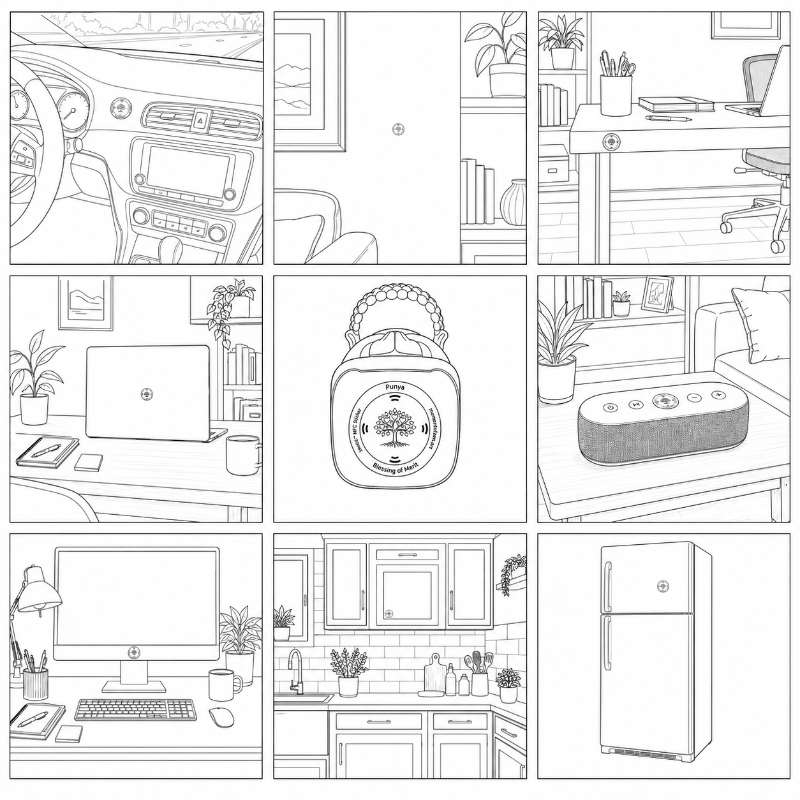
On the figurine
The obvious one, and still the best one. The Buddha becomes the button. Guests will tap it without being asked.
The car dashboard
A breath before the drive. Tap it while the engine warms and start the journey slightly less rushed than you were. Park first.
The wall by your chair
Beside the reading chair, at hand height. The one you reach for instead of reaching for the news.
The edge of your desk
Right where your hand lands when you push back from a hard email. A two-second exit that does not involve another tab.
Your laptop lid
Closing the laptop is already a small ceremony. This gives the gesture somewhere to land.
The speaker
Where the music lives. Tap it when the room is already quiet and you would like to keep it that way.
The monitor stand
Eye level, all day, asking nothing. The most-seen and least-noticed spot in the house — until the afternoon you need it.
A kitchen cabinet
By the kettle, at the pace of boiling water. Waiting is the whole practice, and here you were going to wait anyway.
The fridge door
The most-opened door in any home. Fair warning: steel can mute the signal, so put it on a plastic panel or handle if the first tap is shy.
A few practical notes
- Avoid bare metal. Metal detunes the antenna. On a fridge, a filing cabinet or a steel desk, prefer a plastic, glass, wood or painted surface nearby.
- Pick somewhere flat and clean. The adhesive likes smooth surfaces. Wipe away dust first; it holds far better.
- Think about height. Somewhere you can reach with a phone in one hand, without crouching.
- You can move it. Lift it gently and it will usually go again. Nothing inside is fragile, and the link it holds never changes.
How do I get more Dharma Wisdom Cards?
Tap the sticker again tomorrow. There is a new card each day, and the new one takes the place of the card already in your wallet — so what you carry is always the present day’s, rather than a pile that grows behind you.
- One card a day. Tapping again within the same day brings back the same card, not a new one. Come back tomorrow.
- Nothing to re-add. If you have already saved the card to your wallet, it updates in place. You do not need to save it again.
- Missing a day costs you nothing. There is no streak to keep and nothing expires. Tap when you feel like tapping.
Is there a way to see all my Dharma Wisdom Cards?
Not yet — it is the thing we are building now. You will be able to look back through the cards you have received and keep them as a collection in your wallet, instead of holding only the current day’s.
Until then, a card you want to hold on to is worth sharing or saving elsewhere before the next day replaces it.
More questions are on their way to this page.
If yours is not here yet, write to us — a person will answer.